How to read Google Search Console
By BeeRanked · September 22, 2026
Google Search Console is the only place where Google tells you directly how your site is doing in search, and it is free. It is also widely misread, especially in a site's first months, when the numbers look discouraging if you do not know what order they arrive in. This page covers the two reports that matter, what each metric means, and what a healthy young site looks like, with our own numbers.
The four metrics, in Google's own words
The Performance report tracks four numbers, defined by Google like this: impressions are "how many times your site appeared in Search results", clicks are "the number of times a user clicked your site from Google Search results", CTR is "the click count divided by the impression count", and average position is "the average position of the topmost result from your site".
Two reading tips save a lot of confusion. The newest days on the graph are preliminary and can still change, so do not panic over a dip in the last 48 hours. And you generally cannot verify your positions by searching yourself, because as Google notes, "Search results are specific to the time, place, device, and recent history of the person searching".
Impressions come before clicks
A new site usually goes through the pattern below. These are our own weekly numbers:
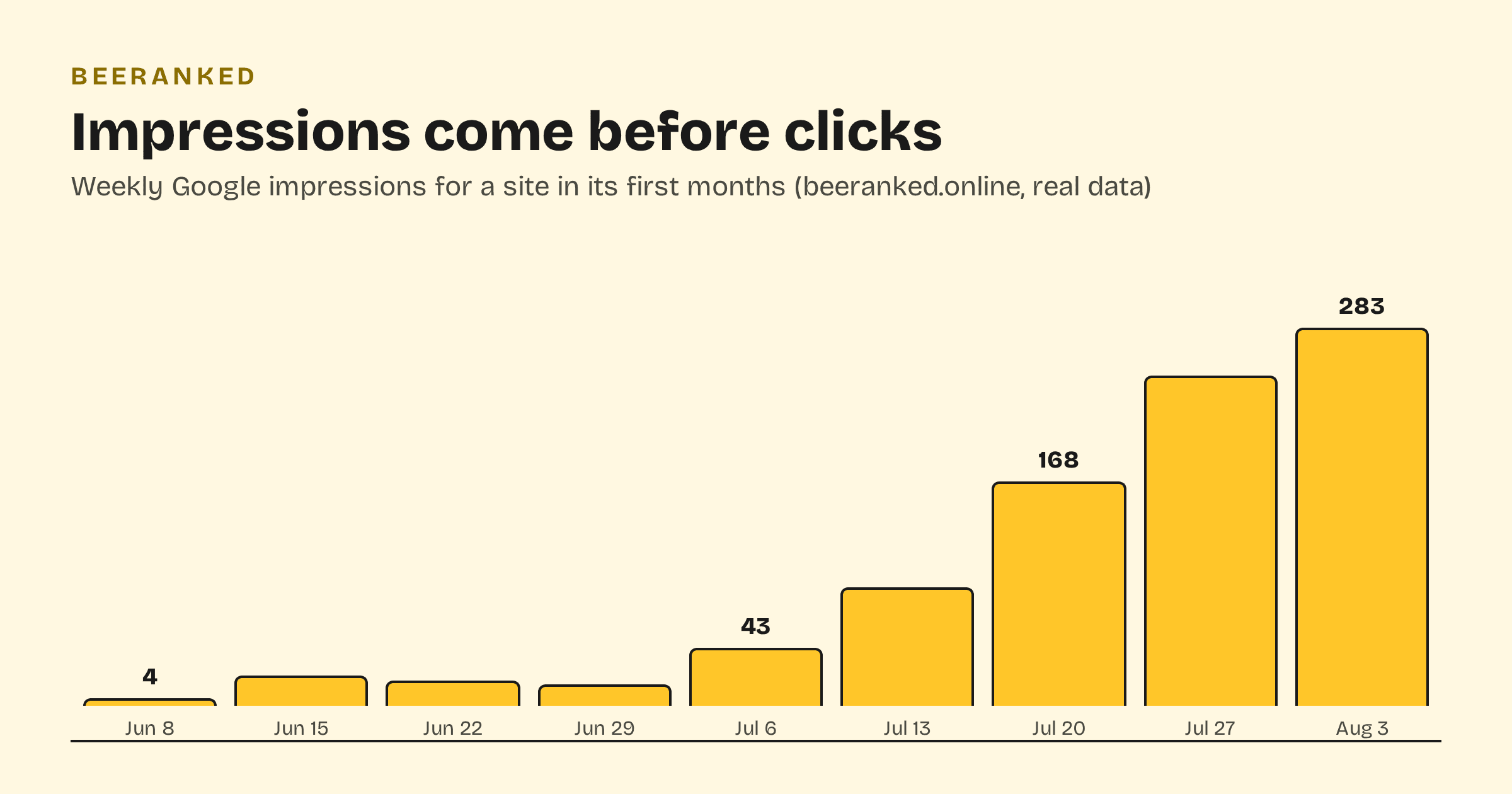
Impressions grow first while clicks stay near zero, and that is the normal order. Google has started showing your pages for queries people type, but deep in the results, often at positions 50 to 90. At those positions nobody clicks, so impressions are the earliest signal you can act on: they tell you which pages Google is testing, and for which queries.
When you see that, reinforce the page. Add internal links from your strongest pages to the page being tested, deepen the topic with related articles, and refresh the page itself if it is thin. Then give it time. Rankings move over weeks.
The quick-win filter
Once some queries reach page one or two, sort the Queries table by impressions and look for positions roughly 5 to 20. These are your quick wins: Google already believes the page belongs near the top, and the remaining work is earning the click and the last few spots. Check that the page's meta description and title promise what the searcher wants, and that the page's best answer is near the top of the page.
A query stuck at position 40 or below usually needs more than titles: more depth, more internal links, or a better page targeting it. And if two of your pages both show for the same query and neither climbs, you may be looking at keyword cannibalization.
The Page indexing report
The second report worth your attention lists which URLs are in Google's index. Not everything will be, and that is by design; Google's own guidance is to make sure "the canonical version of every important page" is indexed. Full coverage is not required.
The status that worries people most, crawled - currently not indexed, is usually Google's triage on a young site. Google says the page "may or may not be indexed in the future; no need to resubmit". Keep an XML sitemap submitted so discovery is never the bottleneck, interlink new pages from existing ones, and keep improving the pages themselves. Mass-clicking "request indexing" does not speed this up.
A monthly reading routine
Open Performance, set the range to 3 months, and note the impressions trend. A rising line means Google is showing your pages more often, even at zero clicks.
List the top queries by impressions. Do you have a page that deserves each one? If a query surprises you, that is free topic research.
Apply the quick-win filter (positions 5 to 20) and improve one or two of those pages.
Glance at Page indexing for errors. Ignore the not-indexed tail unless an important page is in it.
Search Console next to BeeRanked
BeeRanked handles the publishing side of this loop: every page ships with clean titles, descriptions, structured data, and a sitemap that updates itself, so the technical reasons for non-indexing are off the table. Pair that with the goals dashboard to keep your publishing cadence steady, and read the result in Search Console: impressions show what Google is testing, and quick wins show what to polish next.